What to Expect at a Hands-On Claude Workshop (and What to Bring)
What happens in a hands-on Claude workshop?
You spend most of the day using Claude on your own work, with facilitators helping at your table. Clustr's workshop covers how Claude works, prompting, setting up Projects, rebuilding one real task as a take-home workflow, a look at Cowork and Claude Code, and safe use. It runs five hours, four of instruction plus a one-hour lunch, with two facilitators and 20 seats.
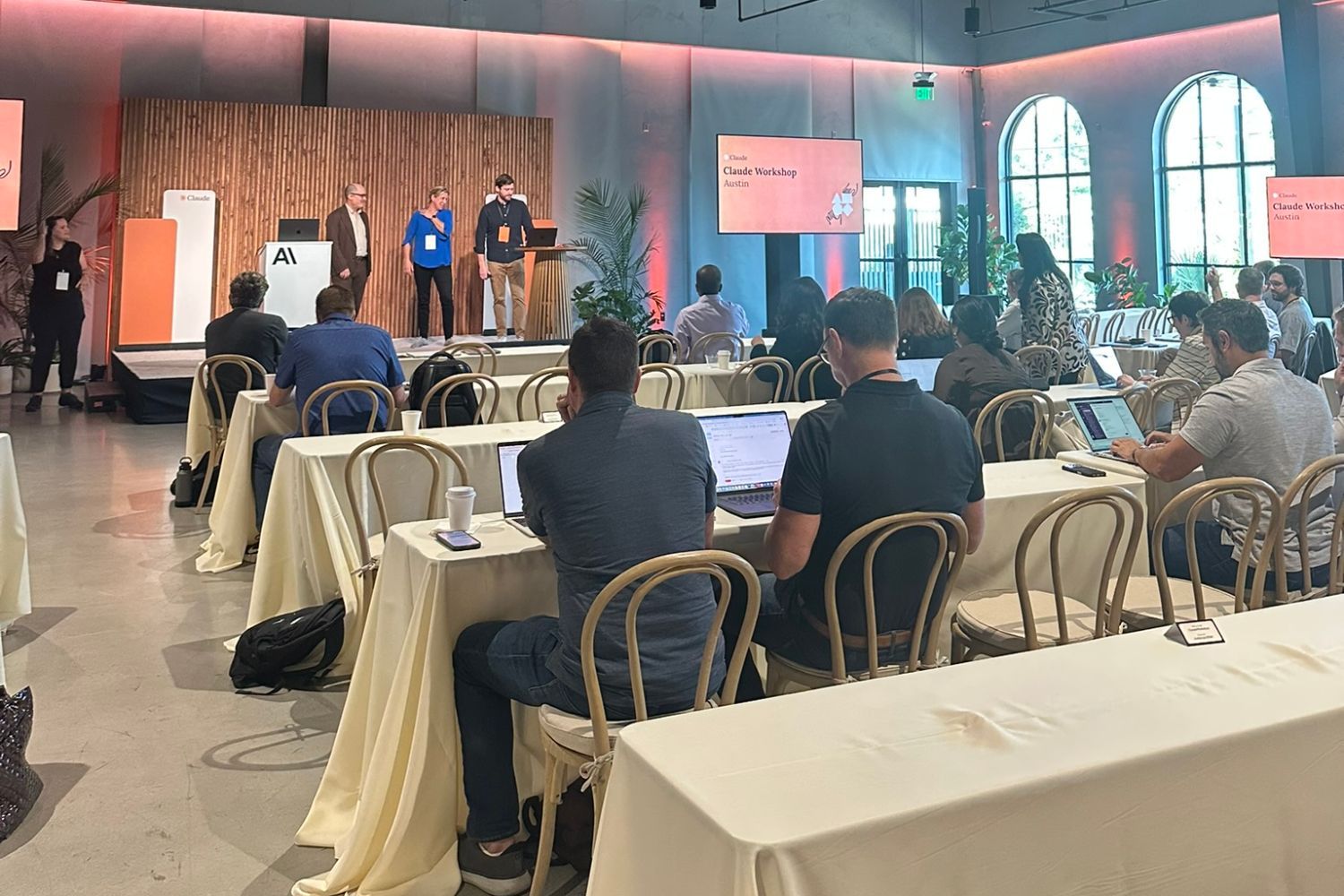
Our next two live Claude workshops are on Wednesday, December 2, 2026 at SparkHaus, 727 Madison Avenue, Covington, Kentucky, and on Wednesday, December 9, 2026 in Cincinnati, Ohio. This post explains what the day looks like, who it suits, and how to get the most out of it, so you can decide whether it is the right next step for you or your team.
Who is a Claude workshop for?
Business professionals who want to use Claude in their daily work: operators, managers, sales and marketing people, analysts, and business owners. No technical background is needed. If you have tried Claude or another AI tool and found the results inconsistent, or you never started because you were not sure where to begin, the workshop is built for you.
It is less suited to people who want deep developer training. We include a guided look at Claude Code so builders know what to explore next, but the day is designed around business work: documents, emails, research, reports, and the recurring tasks that fill a working week.
What does the workshop cover?
Six parts, in order. You learn how Claude works, practise prompting on your own documents, set up a Claude Project, rebuild one real task from your week as a take-home workflow, take a guided look at Cowork and Claude Code, and finish with safe use. Each part builds on the one before, so the day ends with something working.
- How Claude works. Why answers vary, where Claude is strong, where it makes mistakes, and how to check its work before you trust it.
- Prompting. Role, context, task, format, and constraints, practised on your own documents until the first draft is worth keeping.
- Projects. Setting up a Claude Project with your files and instructions, so every conversation starts from what you already know.
- One take-home workflow. Rebuilding a real task from your week in Claude, with a facilitator at the table, and leaving with it working.
- Cowork and Claude Code. A guided look at Cowork for files and processes, and Claude Code for builders, so you know what to explore after the day.
- Safe use. What belongs in Claude and what does not, and how to use it in line with your company's policies.
The order is deliberate. Understanding why answers vary makes prompting easier to learn. Good prompts make Projects worth setting up. And a Project is what turns your take-home workflow into something you can repeat on Monday without starting from scratch.
What should you bring to a Claude workshop?
Bring a laptop and a real task from your week. The task matters most. It might be a report you write every month, a set of notes you turn into an email, or research you do before meetings. You also need a Claude account, and we send setup instructions before the workshop, including which plan works best for the exercises.
- A charged laptop.
- A Claude account, set up using the instructions we send ahead of time.
- One real, repeated task you would like Claude to help with.
- Example documents for that task that you are allowed to use. Leave out anything your company's policy would keep out of an AI tool.
If you are not sure which task to bring, choose the one you most often put off. Tedious, repeated work is usually where a first workflow saves the most time, and it is easier to judge whether Claude's draft is any good when you know the task well.
Why are the workshops limited to 20 seats?
So the two facilitators can get to every table. People learn Claude fastest when someone helps them fix a weak first result on the spot, and that does not work in a room of hundreds. A small room also means you can ask the questions you would never type into a chat box, and hear how people in other roles use it.
When and where are the December Claude workshops, and what do they cost?
The first is Wednesday, December 2, 2026 at SparkHaus, 727 Madison Avenue, Covington, Kentucky, the building Clustr calls home. A seat is $750, or $500 for SparkHaus members. The second is Wednesday, December 9, 2026 in Cincinnati, Ohio, with venue and price to be announced. Each has 20 seats, held in the order requests arrive.
You can reserve a seat on our Claude workshops page. We confirm seats by email and send payment details. If you are coming with colleagues, it helps for each person to bring a different task, so the group leaves with several workflows rather than one.
Has Clustr run live AI workshops before?
Yes. Clustr has led live AI workshops in Austin at Capital Factory, in Miami, and in Charlotte, where we ran a series of Skill Pop workshops for business executives. Those sessions covered AI across platforms. The December workshops focus only on Claude, so the whole day goes into one tool and the habits that make it useful.
Can a company book a private Claude workshop?
Yes. We run private, in-person Claude workshops at a company's own offices, built on the team's real documents and workflows. That suits teams that want everyone working from the same approach, or that need to work with internal material a public workshop would not allow. The structure is similar, but every exercise uses your team's work.
Our Claude page covers training for companies, and in-person AI training explains why we run sessions in the room wherever we can.